[Tutorial] How to Play MAME Roms in Windows
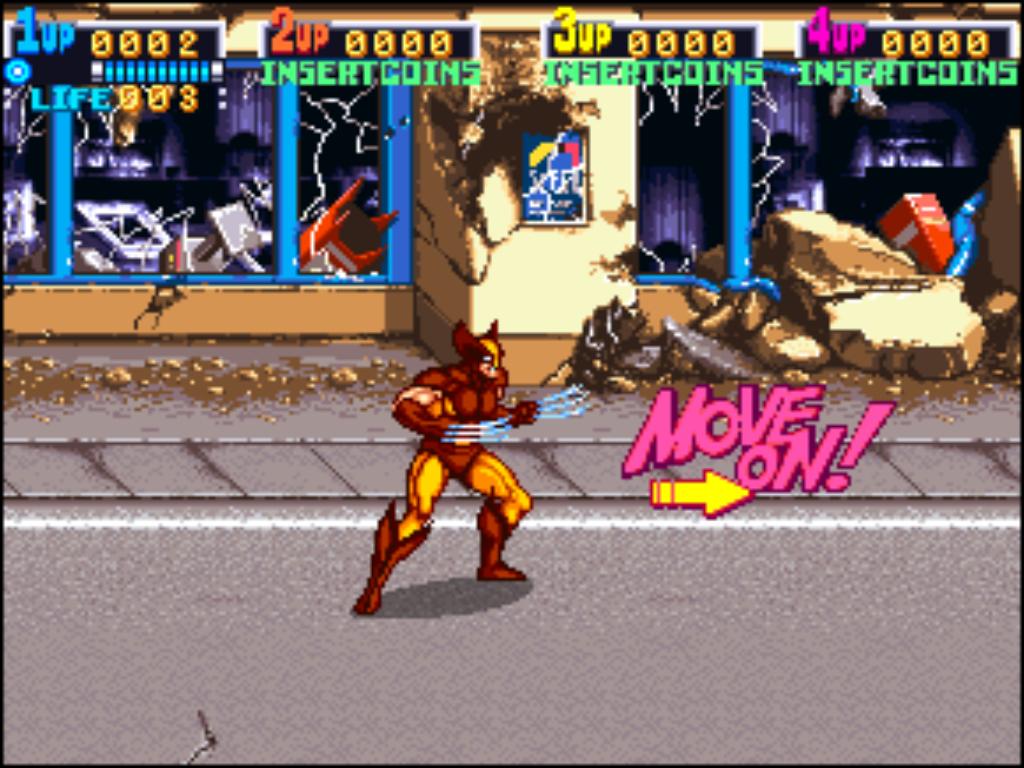
This tutorial is dedicated to underground user Wolf13. Without his request, this tutorial would not have been written.
Revisions:
4-7-09: Added youtube videos for XP and Vista.
1-31-10: Removed youtube video links so I can redo them. Added a new screenshot to clarify putting the ROM into the roms folder.
I was looking at this other thread, where I showed the game ending for the Arcade classic X-men 4 players. I noticed a commentor asking how does one play this game on the computer, which made me create today’s tutorial.
Check out this super easy tutorial, that will have you playing any kind of MAME roms on your computer! Today’s tutorial will only outline how to play the classic X-Men 4 player rom on your computer, but go ahead and feel free to explore with other roms. Technically, you can expand this tutorial to go play SNES, NES, N64, and even Sega Genesis. If you really need that tutorial, please leave a comment so I know! Thanks!
Assumptions:
1) You know how to use a computer.
2) You have an unzipping program. Get and install WinRar at www.rarlabs.com or get free utility 7Zip at www.7-zip.org.
******************
Tutorial:
1) Go to http://www.romnation.net They have a great selection for roms. To play MAME roms, you will need the emulator first. Get it here. Type in the verification code and download that emulator, it is about 7 MB.
2) Now you need a game. The X-Men Mame rom is located here.
3) Unzip your Mame emulator into its own folder on the desktop, or anywhere else you choose. Take the game you just downloaded from step 2, and proceed to cut and paste that entire archived file into the roms folder, located inside your Mame32v103. Then click on the Mame32 icon to launch the program.
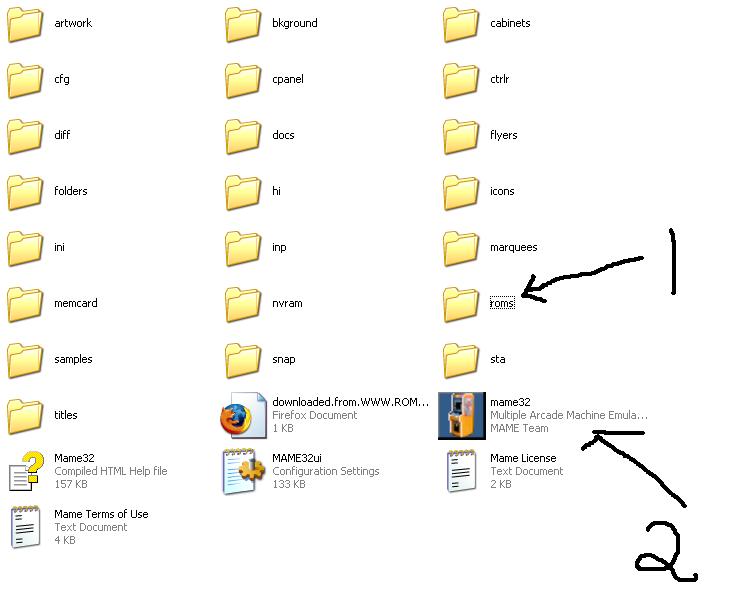
Below is a screenshot of what the content of the roms folder looks like. I literally put the xmen.zip file into the roms folder.

4) Go to File -> Audit all games. This command will now search your roms folder and see what games are available. Press ok when the audit is complete, and now notice that you see X-Men is in the main menu. (click thumbnail to enlarge)

5) Double click the first line there for X-Men, and Zing! The game loads! Press tab to bring up the configuration menu. Go to “Input (for this game)” and there you can configure your controls. From the start, number 5 is your “Player 1 coin”, and left control, left alt, and spacebar are your action buttons. As usual, the arrow keys move your player around. Have fun!

Now get your ass in gear and play this old school game! Don’t stop there, I highly recommend getting the Simpsons arcade game too. Enjoy! – Versatile1 for the win.

Posted on December 17, 2007, in Emulators, Entertainment, Gaming, roms, Tutorials and tagged MAME, Mame32v103, Romnation.net, roms, X-men. Bookmark the permalink. 304 Comments.


 Welcome to the Underground.
Cheers Bro! Wicked tutorial took me awhile but started smashing baddies old school xmen arcade style!
hi how come when i double click the game nothing happens? What is the possible problem? Pls help… Thanks… I followed your instruction but it wont work 😦
What game you using?
x-men, the one in the link… any game doesnt want to play when i double click it…
You put the roms inside the roms folder, right?
It works for X men, but not for Ninja Baseball Batman or Virtual On. Is this because they aren’t on the game list? If so do I need a different emulator or can I reprogram the emulator?
No, try using a different MAME emulator to see if that helps your cause.
Piece of Cake!!! Thanks
The problem is when I audit all game, all the game that I have downloaded are incorrect
what’s the problem ?
Try romnation.net and try a game like x-men 4 player.
same problem, im tryna get king of fighters but it wont find it in my roms folder
Let’s start simple. Get the x-men, and do what my screenshot says. Once that works, then let’s focus on other games.
i can see you dont know what your talking about, you have no idea how to run a mame emulator
Mxim
hey man,
can it work with king of fighters or not??
If you got the ROM, then yes.
i need some help on some games for example simpsons and a boxing game thus far i start playing them and then it flips/rotates the screen 90 degrees any idea how to stop this happening??????
I think your action buttons are Left CTRL and Left ALT, which causing problem during play. Change these actions buttons by pressing TAB button during game.
Hope this will resolve the problem
i keep getting an error stating required rom or chd images is missing…ive downloaded the roms from your link, put it in the correct folder, then run MAME, when i press enter to select that game, thats what it says.
Xmen right? How can you fail?
I keep getting this same error..haven’t been able to figure it out. Were you ever able to solve the problem?
Never had this error, did you try a different game?
I have tried this but its not working, error file missing and it show .bin files not found
Pick different game.
download your mame version bios files then start the game , if not done then try another mame emulator that support these games
Hi, I have downloaded some ROMs (4 to be more precise), but the emulator shows only 4 available game. Please send me an email at this adress: bigtime.oprea@gmail.com. Thanks!
That means its working? It shows your 4 games?
Thanks a lot Than you very much for this tutorial
Hi, I always thought if there is an emulator, it can be used to load the game rom I wanted. But recently when I tried to download
Martial Masters(http://www.romnation.net/srv/roms/56753/mame103/Martial-Masters.html),
it said you need to download its Parent ROM which is pgm as well in order for the game to load…what is that supposed to mean?
How about romnation.net?
ola boa noite estou com um pequeno problema para fazer os jogos do mame funçionare eu queria um tutoriual de como fazerem eles funçionarem
Hi, the rom is exactly from romnation.net, nevertheless I found my solution, I’m currently using nebula emulator which solves everything!
Im trying to get Blodstorm and/or Carnevil but the files are not found…what do i do??
Go get something else then.
it doesnt work..when i click audit all games it says in each command “NOT FOUND (BIOS)”
why? ;(
Try a different game please.
It doesn’t work i downloaded the rom and there wasn’t file ..
HELP PLEASE??
Follow the blog tutorial.
Thank you for the guide. It’s working!
I’m double clicking the first line for x men and nothing is working. Help please?
Go to romnation.net and get it manually.
Versatile, you have such an attitude man, we are all having the same problem, god forbid you made a mistake in the tutorial or files or something. Funny fact, Xmen 4 player has missing rom and or CDH file or whatever it is, while I downloaded another game Battletoads and that works. You, sir, fail
Or the rom itself has failed since this tutorial was written. Do you think I would take failed screenshots? That would be a waste of your time and mine.
Nonetheless, I shall re-review this tutorial and see where the pitfall is.
Update #1:
This tutorial is flawless with xmen.zip game. See my screenshot links below for proof of successful audit, and also the games in my library. Please explain why this game works for me, but not for you.
http://prntscr.com/12awqp
http://prntscr.com/12awt3
I believe this is among the such a lot vital info for me.
And i’m happy reading your article. But want to statement on few general issues, The website style is perfect, the articles is in reality excellent : D. Just right activity, cheers
I did everything done for this tutorial and when I audit all games… my game was never found
The exact files I have for this tutorial should work for you. Also, the roms work with certain mame emulators and bios files I do believe. If you try xmen 4player, it would work. It did for me.
Great information. Lucky me I came across your blog
by chance (stumbleupon). I’ve bookmarked it
for later!
I go audit all games and it doesn’t read (find) game i’ve put in ROMS dir. The name of the game is Kazan ninja (kazan.zip).
I menages to start the game but it seis ”one or more roms for this game have not been correctly dumped” . what should i do?? it’s kazan.zip game ninja kazan
hello??
This is not an instant messenger service. I answer it when I visit the blog.
other games work normally, just this one is not working?? why??
No idea, time to get a different game.
tnx!! you are the best bro!!
I can download the 7zip file and any game file BUT I cannot not unzip the 7zip file nor can I cut and paste anything…followed all procedures on this blog. BTW I have windows 8.1. Tell me what I am doing wrong.
Get 7-zip.org
Did everything that the tutorial says to do but I cannot get Xmen to load; it says in a dialog box that the required files are missing in order to run the game! Now what do I do?
It doesn’t make sense guys. Follow the tutorial and use same files I did to make sure it works on your end.
Tutorial is garbage. Doesn’t work at all.
Using the same emulator and same rom, my game works fine. Why not yours?
Hi, I’m trying to play Primal Rage on MAME, and I keep getting a error that some ROM or CHD files are missing. The overall is “Unemulated Protection.” I’ve been looking online to find it, but all i’m finding is the CHD file for Primal Rage 2. Can anybody help me here, I have no idea what to do with this fix/figure out this fix?
any working roms at romnation.net or coolroms.com?
I have been trying to get mame32’s street fighter ex roms cause when I try playing it I get the roms missing message plz help
Try a site like romnation?
Thanks! It works!
Thanks for the tutorial.Now I can play Burgertime.
how do i play house of the dead on mame?
Find the rom and use your favorite mame emulator program.
I got here from pinterest well done on a great social media campaign
i used this to play sinistar but it resets to factory settings and then i cant do anything!…Can you Help?
not sure why it would do that, that is weird.
Mame doesnt work, downloaded installed it opens and everything is either missing some or non functional
Try a different rom.
my had not come then i pressed refresh it took some time but the the games had come and i played
Pingback: Legi Balkan Pharmaceuticals Steroids
Pingback: Teknomw3 Dedicated Server Tutorial | Virtual Private Server
Pingback: Teknomw3 Dedicated Server Tutorial – Fast Server
Pingback: Teknomw3 Dedicated Server Tutorial – Virtual Private Server